


BigOven Recipes & Meal Planner
4.67.90K Reviews
App Specs
- Version
- 6.2.31
- Updated On
- License
- Free
- Downloads
- 1,000,000+
- Developer
- BigOven.com
- Categories
- Food & Drink
- Platform
- Android
Screenshots
 Analysis by AppCompare
When I open the fridge without a dinner plan, the hard part is often not cooking but choosing what to make from what is already there. BigOven Recipes & Meal Planner is built for that moment: it brings recipe browsing, meal planning, and shopping-list organization into one food app. I find it most useful when I want to turn a loose idea into a practical plan, rather than scroll through recipes with no clear next step.
From a loose idea to a dinner plan
A realistic way to use BigOven is to start with the ingredients that need attention, then look for a recipe that fits the evening. If I have a vegetable, a protein, and a limited amount of time, searching around those ingredients can help narrow the choices. The key is to treat the results as inspiration, not a promise that every suggestion will match my exact pantry or cooking preferences. I still check the recipe details before committing.
That small check matters because a recipe can look right in a search result but call for a missing staple, a different cut of an ingredient, or more preparation than I have time for. I use the recipe itself as the decision point: do I have the ingredients, can I manage the steps tonight, and will the amount suit the people eating? Making that call before adding a meal to a plan helps prevent a shopping list full of recipes I never actually cook.
Turning selected recipes into a workable week
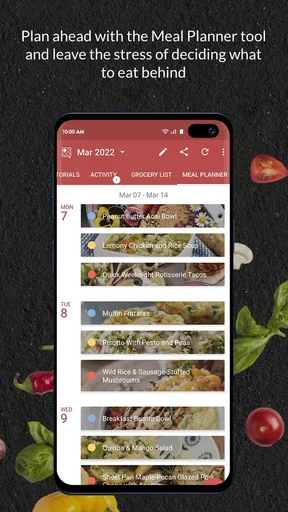
Once I have a few likely meals, the planner is the part that gives the app a purpose beyond browsing. I can arrange meals across the days I want to plan, then use those choices to build a shopping list. I would not fill every night automatically just because there is room: leaving a flexible evening makes sense for leftovers, plans that change, or a night when I would rather keep dinner simple.
Adjusting servings is useful when a recipe needs to suit a different number of people, but I still treat scaled quantities as a starting point. Some ingredients are easier to adjust precisely than others, and seasoning or cooking time may need attention rather than a perfectly proportional change. For a first attempt at a recipe, I prefer to read through the instructions and make sure the altered amount still feels manageable.
The handoff from plan to store
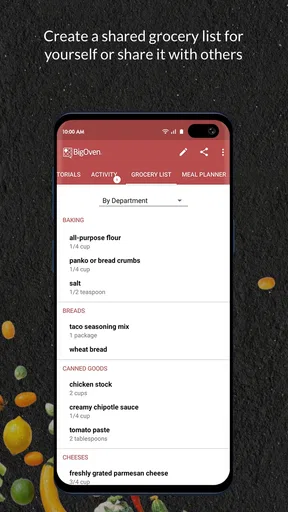
The shopping list is where meal planning becomes a real errand. Generating it from planned recipes reduces the need to copy ingredients by hand, while manual additions give me a place for household basics that are not part of a particular dish. The aisle-style organization can make a store visit easier to scan, though I still check the list against what is at home before leaving. That quick check is what keeps a digital list from becoming a duplicate-purchase list.
For a shared household, a phone-based list is also more practical than a note left on the kitchen counter: whoever is shopping can refer to it on their own device. BigOven describes the list as syncing across devices, which suits people who divide planning and shopping. I would still agree on who is editing it and when; otherwise, a late change to the dinner plan can leave the shopper with an outdated idea of what the meal requires.
Worth Reading Before You Choose

EA SPORTS FC Mobile 26 Is a Bigger Football Game, but It Takes Time

Flipboard Shows What News Apps Must Do Beyond the Feed

Switching to Android Auto Means Rethinking Your Driving Routine

Google Calendar Makes a Crowded Week Easier to Manage

Ludo King Makes the Most of the Minutes Between Plans

Baby Panda World Brings Quick Play to Modern Phones, but Its Game Library Feels Busy
Finding ideas without losing your own taste
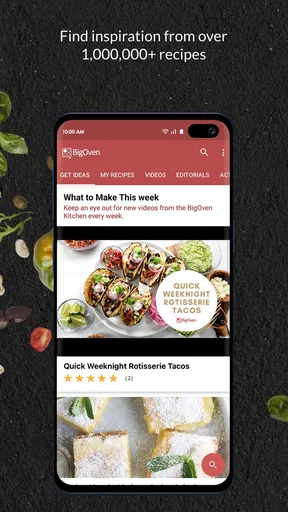
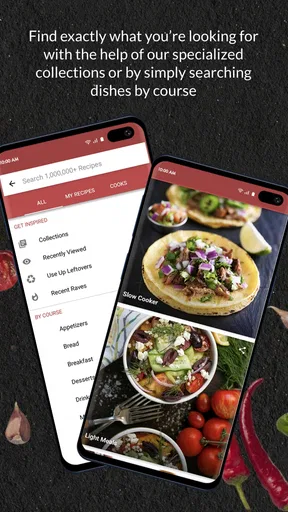
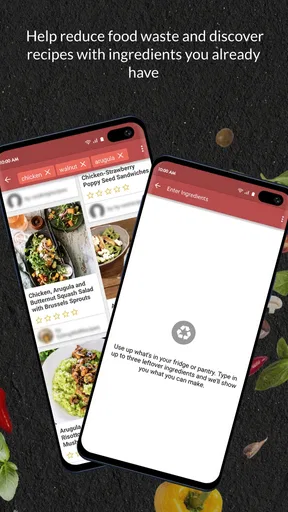
Recipe discovery is a strength, but a large collection can also make choosing feel like another task. I get more out of searches when I begin with a clear constraint—an ingredient, meal type, or dietary need—instead of browsing without direction. The “Use Up Leftovers” option is especially useful when the goal is to reduce waste, but I still judge whether the suggested combination sounds appealing and whether it uses enough of the ingredients that need to go.
Saving favorites offers a way to make repeat cooking less dependent on searching from scratch. The community side can add fresh ideas and let people share their own recipes, but it is not essential to the basic workflow. If I mainly want a dependable routine, I can focus on saved recipes, planning, and the list rather than treating social activity as another thing I have to keep up with.
Who will get the most from it
I would recommend BigOven to home cooks who often ask, “What can I make with this?” and to people who want recipes, a weekly outline, and a shopping list connected in one place. It can also help someone learning to cook because browsing gives them options to explore, while a saved collection can gradually become a personal set of go-to meals. The most useful habit is to plan around meals you genuinely expect to cook, not an ambitious week of recipes that looks good only on screen.
It may be less suitable if you already have a trusted recipe source and only need a bare-bones grocery checklist. A dedicated list app can feel quicker when planning meals is not part of the problem. Likewise, cooks who prefer to improvise every night may find a calendar-like planning approach more structure than they want. BigOven’s value comes from connecting the stages; if you only need one stage, the combined toolkit may be more than you need.
Getting Started with BigOven
First things first, downloading the app is a breeze. Available for both Android and iOS, BigOven is ready to jump onto your device and start working its culinary magic. Once installed, the app greets you with a clean, intuitive interface that's easy to navigate, even if you're juggling a spatula in one hand and your phone in the other.
The sign-up process is straightforward, and you can even use your Google or Facebook account to save some time. Once you're in, the app opens up a world of recipes, meal planning tools, and a digital grocery list that syncs across your devices. Pretty cool, right?
Exploring the Recipe Universe
Now, let’s talk about the heart of BigOven – its massive recipe database. With over 350,000 recipes, you'll never run out of ideas. Whether you’re craving something exotic or just want to nail that perfect chocolate chip cookie, BigOven has got you covered. Searching for recipes is super flexible. You can filter by ingredients, dietary needs, or even the meal you’re planning for.
One feature that really caught my eye was the "Use Up Leftovers" option. You just punch in what you have on hand, and bam! BigOven suggests recipes that help you make the most of your ingredients. No more wasting that sad-looking zucchini at the back of the fridge!
Meal Planning Made Simple
If you’re like me and need a bit of structure in your culinary adventures, the meal planner is a godsend. You can plan meals for the entire week, or just a few days, and the app will help you create a shopping list based on those meals. Talk about a stress reliever! Plus, you can adjust serving sizes, which is perfect for when you're cooking for a crowd or just flying solo.
Shopping List and Grocery Management
Speaking of shopping lists, BigOven’s digital list feature is a game-changer. It organizes items by aisle, making your trip to the store as efficient as possible. You can add items manually or let the app auto-generate the list from your planned recipes. And if you’re the type who forgets the list at home, no worries – it’s all on your phone!
Social Features and Community
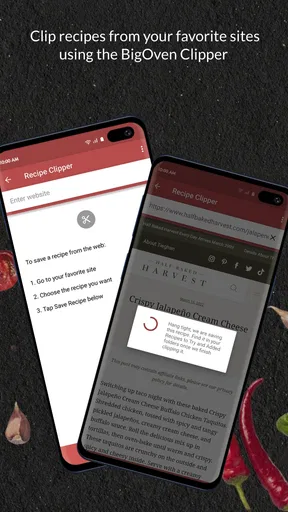
Another neat aspect is the social feature. You can follow other users, share your culinary creations, and even get feedback. It's like having a foodie community right in your pocket. You can also save your favorite recipes, and if you’re feeling adventurous, upload your own to share with the world.
BigOven’s community is vibrant, with users from all over the globe sharing their unique recipes and tips. It's a fantastic way to broaden your culinary horizons and maybe make some new foodie friends along the way.
Where the routine can stumble
The handoffs are convenient, but they do not remove the need for a little kitchen judgment. A planned recipe becomes a shopping list, yet the list cannot know which ingredients are already in the cupboard unless I check them. A recipe search can surface promising options, but I still need to decide whether the instructions suit my equipment, confidence, and available time. I see the app as a planning aid, not an automatic cook or a guarantee that every result will fit my evening.
There is also a trade-off between breadth and focus. Having many recipes to browse is helpful when I feel stuck, but an open-ended search can turn dinner planning into a long comparison session. I get better results by setting one or two boundaries first, such as using a particular leftover or choosing a meal type, and then stopping once I find an option I can actually make. That keeps the app from becoming another source of decision fatigue.
BigOven is a free app from BigOven.com, with in-app purchases offered as well. Its average rating is 4.6 from around 35 thousand ratings, and it has been installed over a million times. It is rated for teens, so it is not presented as an app exclusively for adults. The current version is 6.2.31, and it requires Android 5.0 or later. Those details make it easy to judge whether it fits your device and expectations, while the optional purchases are worth checking in the app if you are deciding whether its extra paid offerings matter to your routine.
Choosing it over a recipe site or a simple list
Compared with searching the web for one recipe at a time, the useful difference here is the route from discovery to a meal plan and then a grocery list. A general recipe site may be enough if I only need cooking instructions; a basic notes or checklist app may be better if I already know exactly what to buy. BigOven sits between those approaches. I would choose it when I want the recipe and organization steps to inform one another, rather than manage them in separate places.
That connected approach is strongest for repeatable home routines: deciding on several dinners, checking what is missing, and taking the resulting list to the store. It is less compelling if my main concern is a specialized diet or a highly controlled nutrition plan and I need detailed tools to validate every ingredient. In that situation, I would verify recipes carefully or use an option built around those specific requirements instead of assuming a broad recipe search will handle them.
A calmer answer to “what’s for dinner?”
For me, the best outcome is not a perfect week of meals; it is fewer last-minute decisions and a clearer handoff from idea to shopping. If I choose realistic recipes, review the list, and leave room for the week to change, the app can make cooking feel more organized without taking away the freedom to improvise. If I want only a quick list or prefer to choose dinner spontaneously every day, I would skip the planning side and use a simpler tool.
Overall, BigOven Recipes & Meal Planner is worth trying if recipe discovery, leftovers, planning, and grocery organization are all part of the same problem for you. I would start with one or two meals, use the leftover search when there is a clear ingredient to use, and see whether carrying the plan through to the store saves effort. That small trial gives a fair sense of whether its connected workflow suits your kitchen, without turning meal planning into another chore.
Pros
- Extensive recipe database available.
- User-friendly meal planning feature.
- Recipe scaling for portion adjustments.
- Shopping list syncs across devices.
- Nutritional info for health tracking.
Cons
- Some features require a premium subscription.
- Occasional app lag on older devices.
- Limited offline access to recipes.
- Ads can be intrusive for free users.
- Interface updates can be inconsistent.
FAQs for BigOven Recipes & Meal Planner
What features does BigOven Recipes & Meal Planner offer?
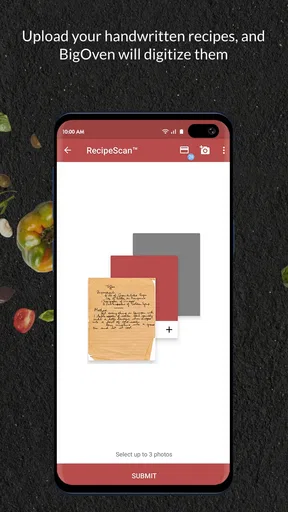
BigOven provides a comprehensive suite of features designed to enhance your cooking experience. It offers over 350,000 recipes, a meal planner, a grocery list function, and the ability to upload your own recipes. Additionally, it includes a social feature where you can connect with other users, see their meals, and get inspired.
Is BigOven free to use, or does it require a subscription?
BigOven is free to download and use, offering basic features at no cost. However, it also provides a Pro membership which includes additional features like ad-free browsing, custom folders for your recipes, and enhanced search capabilities. The Pro version requires a subscription, which can be billed monthly or annually.
Can I use BigOven offline?
While BigOven requires an internet connection to browse new recipes or access certain features, it allows users to save recipes for offline use. This means you can plan your meals and access your saved recipes even when you don't have an internet connection, making it convenient for cooking anywhere.
How does BigOven help with meal planning and grocery shopping?
BigOven simplifies meal planning by allowing you to organize your meals for the week. Once your meals are planned, you can generate a grocery list from the selected recipes. This list can be adjusted based on your pantry items, helping you save time and avoid unnecessary purchases.
Is BigOven suitable for dietary restrictions or specific diets?
BigOven caters to various dietary needs by allowing users to search for recipes based on dietary restrictions or preferences. Whether you're vegan, gluten-free, or following a keto diet, BigOven offers filtering options to help you find recipes that meet your specific requirements, ensuring a personalized cooking experience.


